<Overview>
Fast content search across large numbers of files.
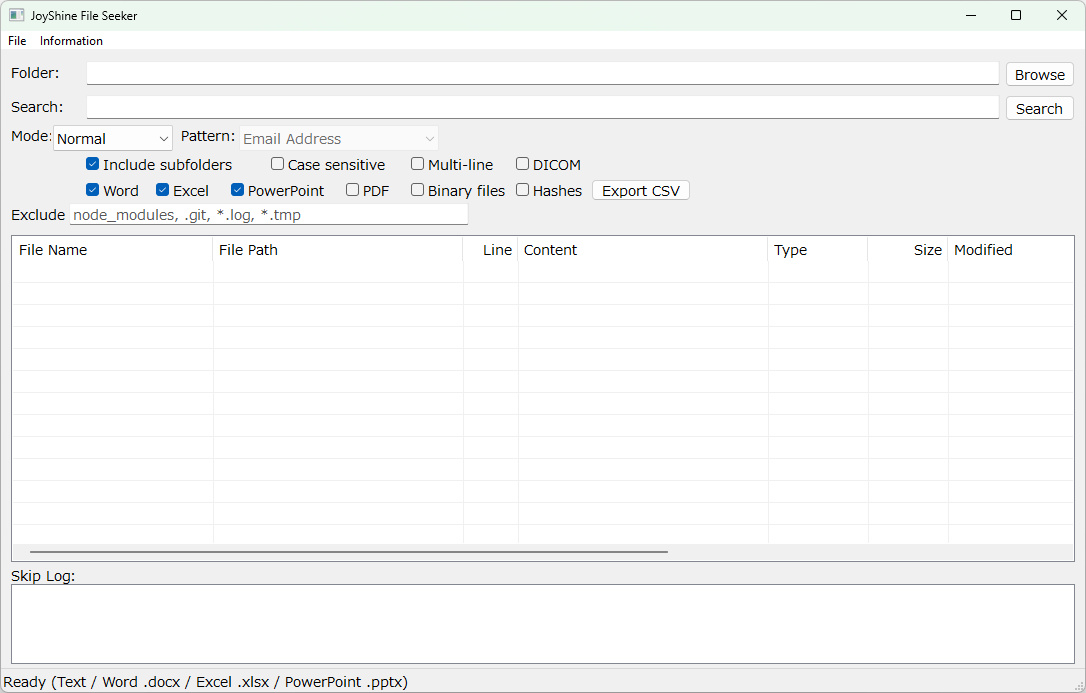
Performs keyword and regular-expression searches over text files, Office documents (Word/Excel/PowerPoint), and PDFs under the specified folder, and can also search DICOM patient metadata.
For forensic use, MD5 and SHA-256 digests can be added to the result list.
File format is detected from the file's internal contents rather than its extension, so confidential documents disguised as backup files are still picked up.
<Features>
• Supported formats: Text files (.txt .csv .log .xml .json) plus .pdf .docx .xlsx .pptx and .dcm (DICOM). Their content is extracted and searched.
• Three search modes:
Normal: Plain substring match
Regex: Regular expression
Pattern File: Choose a named regular expression from the bundled patterns.txt. 32 ready-to-use patterns are included covering email, phone numbers, ID numbers, URLs, hash digests, API keys, and more.
• Hash computation: Optionally output MD5 / SHA-256 for each hit file in the result list.
• CSV export: Save the entire result list to a CSV file.
• See through disguised file extensions: Confidential documents disguised as backup files etc. (which would normally be skipped) are picked up and searched.
<How to Use>
1. Launch JoyShine File Seeker.exe.
2. Specify the search target in the Folder field (Browse button, or drag and drop from Explorer. Multiple folders can be separated by commas).
3. Choose a Search Mode (Normal / Regex / Pattern File).
4. Enter the search criteria:
• Normal / Regex: type into the Search field.
• Pattern File: pick a name from the Pattern dropdown.
5. Toggle options as needed (recursive search, case sensitivity, target file types, hash computation, etc.).
6. Click Search.
7. Double-click a row in the result list to open the file's location in Explorer (DICOM files open in the built-in viewer).
8. Right-click a row for the context menu (Open in Explorer, Open File, copy operations, etc.).
9. Use the Export button to write the result list to a CSV file.
<System Requirements>
• Windows 10 / 11 (64-bit)
• No installer, no additional runtime required
<Download>
▼ Download (1.0 MB)
The zip contains the executable, patterns.txt (regex definitions for Pattern File mode), README.txt (English), README(Japanese).txt, and THIRD_PARTY_NOTICES.txt.
<Third-Party Software>
This product statically links OpenJPEG (BSD 2-Clause) and embeds Adobe-Japan1 CID-to-Unicode mapping data (BSD 3-Clause).
See THIRD_PARTY_NOTICES.txt for the full license texts.
<Disclaimer>
The author makes no warranty as to the accuracy or suitability of this program for any particular use.
<Contact / Error Reports>
https://lee22.net/contact.html