<Overview>
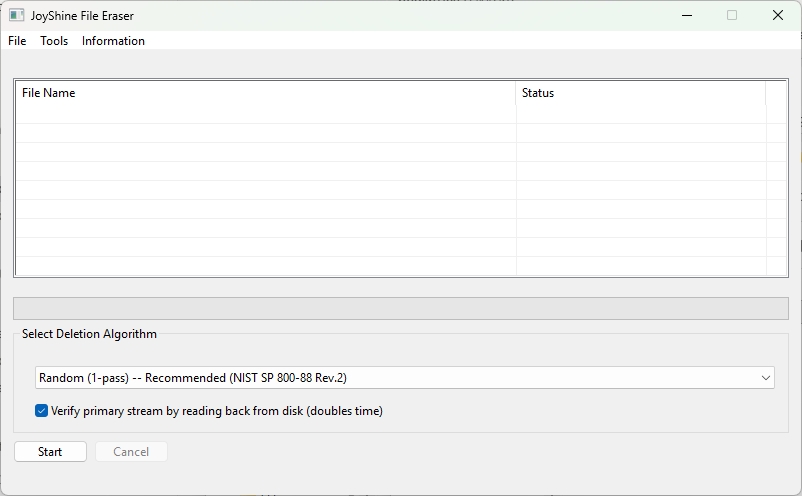
JoyShine File Eraser is a single-executable overwrite tool for files and folders.
No installation, no administrator privileges, and no additional DLLs are required.
When you perform a normal file deletion on Windows, in most cases the management information indicating the file's existence (such as NTFS MFT entries, directory references, and space allocation bitmaps) is merely marked as "unused," and the actual data area is not necessarily overwritten at that moment.
This program overwrites the data region that would be left waiting for reuse before it deletes the file, making standard recovery difficult.
The default method is a single-pass random overwrite based on the principles of NIST SP 800-88 Rev.2. Legacy multi-pass profiles are also available for compatibility with older policies.
<Supported Algorithms>
0. Random (1-pass) — Recommended (NIST SP 800-88 Rev.2) [default]
1. Zero fill (1-pass) — Recommended
2. GOST R 50739-95 (2-pass)
3. DoD 5220.22-M (3-pass)
4. DoD 5220.22-M ECE (7-pass)
5. HMG IS5 Enhanced (3-pass)
6. Schneier (7-pass)
7. BSI / VSITR (7-pass)
8. Gutmann (35-pass)
<Additional Features>
Optional read-back verification of the primary stream, Wipe Free Space (fill and delete the free region of the target volume), SSD detection warning (overwrite-based erasure on SSDs is inherently limited due to wear leveling), Alternate Data Stream coverage, filename scrambling before overwrite, explicit clearing of NTFS compression / sparse attributes, and file extension to the next cluster boundary for slack-space coverage.
<How to Use>
1. Double-click JoyShine File Eraser.exe to launch.
2. Drag and drop files or folders into the list area.
3. Select an erasure algorithm (default = "Random (1-pass) -- Recommended (NIST SP 800-88 Rev.2)").
4. Check the "Verify primary stream by reading back from disk" option (recommended: ON).
5. Click [Start]. If you click [Cancel] during the process, the operation will be canceled before the next file begins.
Selecting Tools → Wipe Free Space... from the menu lets you overwrite and erase the "free space allocatable as a normal file" on the volume that contains the specified folder.
Areas that cannot be accessed through the file system, such as the MFT, USN journal, shadow copies, and the hidden physical regions inside an SSD, are not covered.
<Important Limitations>
This program is intended for overwriting and deleting individual files, and it does not guarantee complete media sanitization, including SSD / NVMe wear leveling, backups, shadow copies, file system journals, and cloud sync history.
• On SSD and NVMe drives, the host cannot control the physical sectors targeted by an overwrite due to wear leveling, so host-side overwrites are limited in effectiveness.
The program shows a warning if it detects such a drive.
For reliable erasure, ATA / NVMe Sanitize, or full-drive encryption such as BitLocker combined with key destruction, is recommended.
• Alternate Data Streams (ADS) are subject to overwriting, but read-back verification is applied to the primary stream only.
• When multiple hard links exist, the content overwrite affects all links (which share the same underlying data), but only the dropped link name is deleted.
• For verification, the program uses mt19937 as the pseudo-random number generator, seeded from a cryptographic source.
The output is statistically strong, but it is not a strict CSPRNG.
• When canceled, files that were in progress may remain on disk under their scrambled names.
• Wipe Free Space targets only the free space that can be allocated as a normal file.
It does not affect the MFT, USN journal, shadow copies, or the hidden physical areas inside SSDs.
Also, depending on volume conditions, if the size that can be allocated at once is smaller than the total free space, the remaining free space may be left unwritten.
<System Requirements>
• Windows 10 / 11 (64-bit)
• No installer, no .NET, no Visual C++ Redistributable required
<Download>
▼ Download (115 KB)
The zip contains the executable, README.txt (English), and README(Japanese).txt.
<Disclaimer>
The author makes no warranty as to the accuracy or suitability of this program for any particular use.
<Contact / Error Reports>
https://lee22.net/contact.html